Table of Contents
Introduction
The purpose of this project is to add spell-check capabilities to SMS.
Spell Check Standards
The standards for spell-check in today's software include:
- Background (real-time) spell-check that does not require manual invoking by the user.
- Visual indication of misspelled words (via red wavy underlining)
- Right-click options to suggest and apply correct spellings.
- The ability to add words to the dictionary.
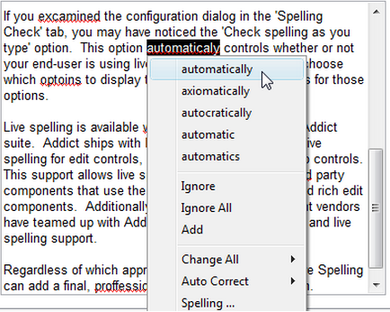
The SMS spell-check addition meets all of these requirements.
- The Add menu option adds the word to the user's custom dictionary.
- The Auto Correct menu option displays the most likely spellings for that word, but when selected it adds the incorrect word and its replacement to the auto-correct list. All Auto-Correct values are written into that user's custom dictionary so they only apply to that individual user.
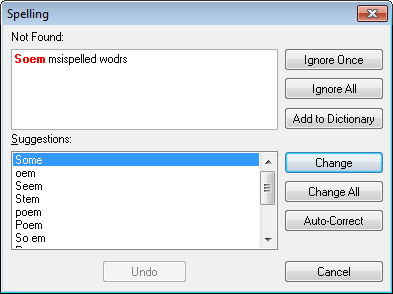
- The Spelling … menu option opens the spelling pop-up screen for that word. It can also continue to spell check the rest of the component moving forward to the end and then circling back to the beginning of the component if you have not selected a particular word when right clicking.
For any component that is being live-spell checked (and perhaps any other), when the user clicks on a word that is not misspelled, the menu will include an option Spell Check … which will open the spelling checker dialog for the entire component. When there are no misspelled words, the following message will be displayed:
There are no misspelled words in this message. Congratulations!
Dictionaries
Standard Dictionaries
Addict dictionary files use the adm extension and should be stored in the Cyrious\SMS\Dictionaries folder. SMS will attempt to load all files with an adm extension in the Dictionaries folder.
The following dictionaries will always be present:
- en-us.adm - American English Dictionary
- en-uk.adm - British English Dictionary
- en-au.adm - Australian English Dictionary
- fr.adm - French Dictionary
- sp.adm - Spanish Dictionary
The following dictionaries will also be present:
- Technical.adm - contains a custom-made technical information for math, computers, accounting, etc. This dictionary is available on the addictive website.
- Industry.adm - a custom-made dictionary created for the Sign and Graphics Industry. Creating this dictionary using the Dictionary builder tool provided by Addicitive is a part of this project. Initially this dictionary will be filled with only a few terms but it will be the dictionary we add to and update on every installation.
Custom Dictionary
In addition to the standard dictionaries, each employee has a custom dictionary stored in the Cyrious$\SMS\Dictionaries folder. Custom dictionaries use an adu extension, and each users dictionary will be named based on the login user name. If the user name changes, that employee will lose all customization in their custom dictionary.
- {username}.user.adu - the custom dictionary for (all) SMS users.
Spell-Check Setup Options
The dictionary settings will be found under Mgmt | Set-Up | Setup User Options | Spell Check Options.
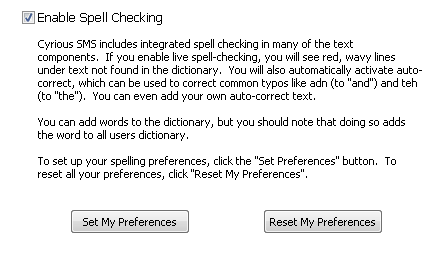
Clicking the “Set My Preferences” button opens the following options dialog.
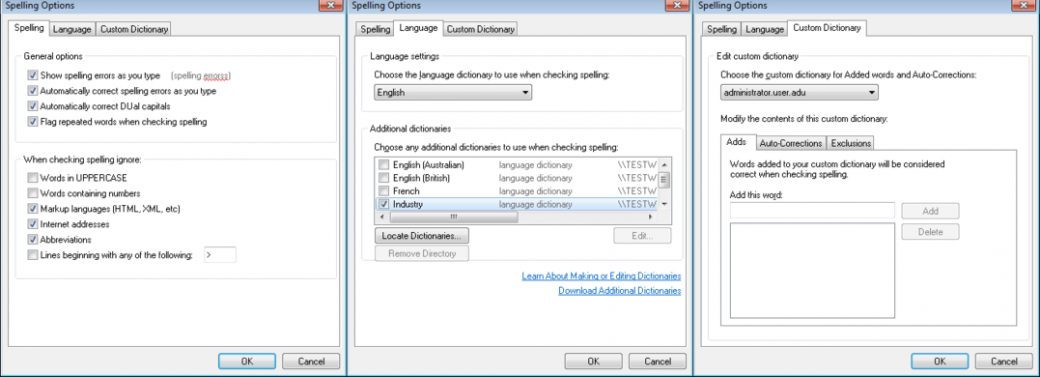
All of the dictionary preferences will be stored for each user inside of SMS.
Clicking the “Reset My Preferences” button deletes the users SpellCheckOptions option and resets the users values back to the default.
Default Values
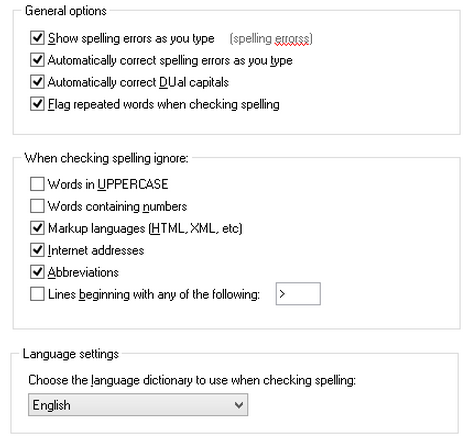
The default values for the spell-check options are:
Bonus Features
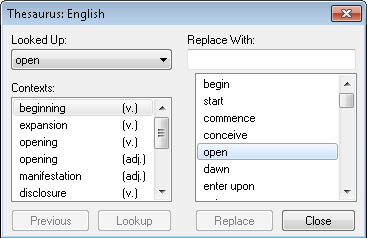
- Thesaurus (available in right-click options) - Only shows when words that are correctly spelled are selected.